The App Question: What You're Actually Downloading
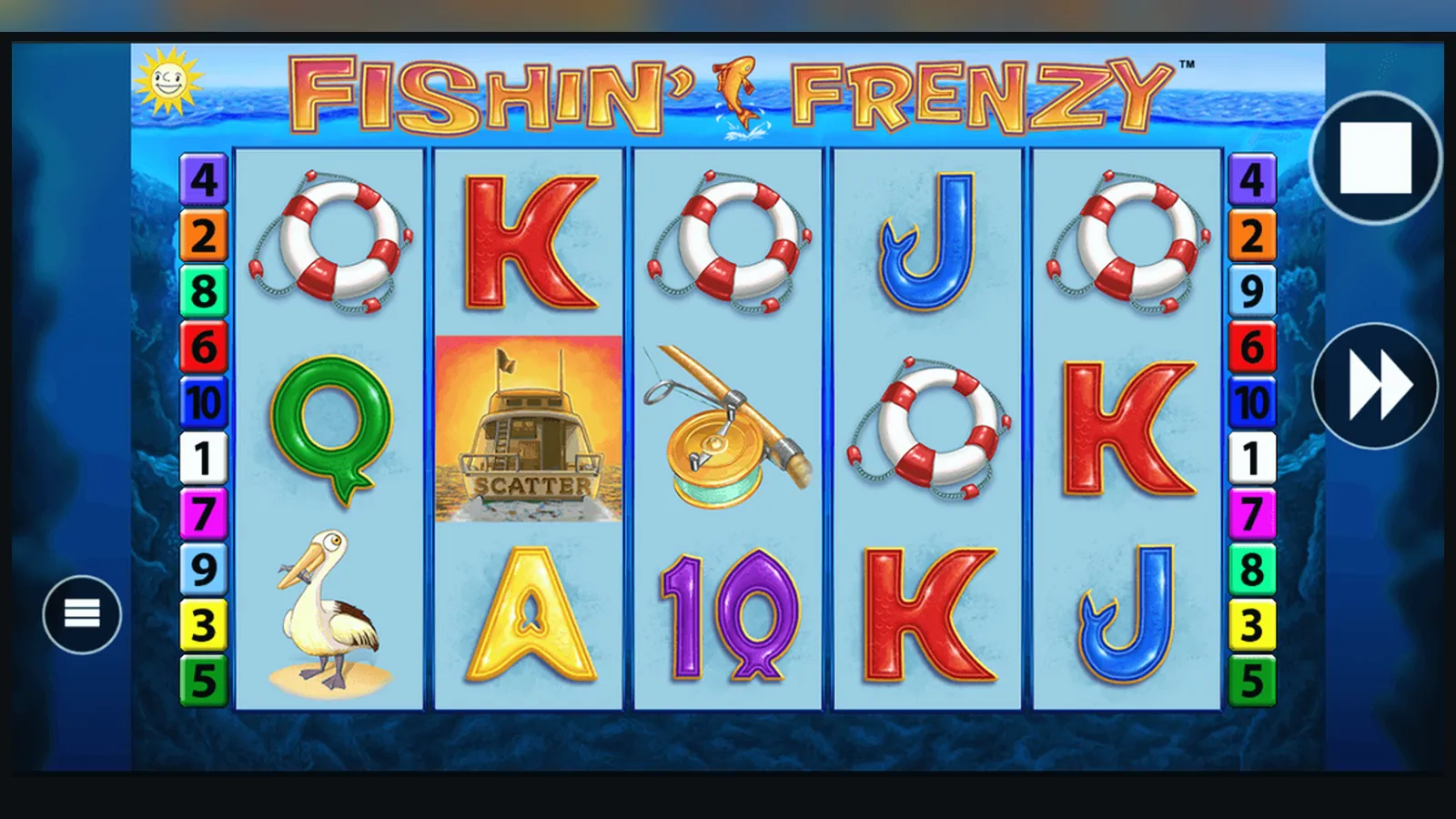
Here's the mistake: searching «Fishin' Frenzy APK download» and grabbing the first link. You'll find dozens of sites offering an APK, most of them hosting a clone of the game with no connection to a UKGC-licensed operator. That file might launch a slot that looks right, but the maths, the RNG certificate, and the money flow sit outside British regulation—and outside your legal recourse if something goes wrong.
The reality is simpler and less dramatic than the APK rabbit hole. Fishin' Frenzy, developed by Reel Time Gaming and distributed by Blueprint Gaming, lives inside the casino platforms that hold UKGC remote licences. Those operators either serve the game through mobile browsers or package their entire catalogue into a dedicated app. You're not downloading «the Fishin' Frenzy app»—you're downloading the operator's app, then launching Fishin' Frenzy from its lobby. That distinction matters when you're trying to work out what's real and what's a counterfeit magnet for your payment details.
The Store Card: What the Real Thing Looks Like
If you open the Google Play Store or the App Store and search for Fishin' Frenzy, you won't find a standalone title from Blueprint Gaming. What you will find are casino apps—Betfred, Paddy Power, Sky Vegas, Grosvenor, and others—that list Fishin' Frenzy in their game libraries. Each operator's app presents itself with its own branding, but the game inside is the same: the Blueprint-certified version running under the operator's UKGC licence.
To give you a reference frame, here's what a typical operator app card looks like when it includes Fishin' Frenzy in the catalogue. These numbers are illustrative—real figures shift with every update—but the structure is consistent across UKGC-licensed operators:
The in-app purchases line is the clearest signal: you're buying chips or credits that work across the operator's entire game catalogue, not paying for a one-off download of Fishin' Frenzy. The free download with in-app purchases model is standard for UK casino apps because the game itself isn't the product—the account, the payment rails, and the regulatory wrapper around the RNG are.
Five Screens That Tell the Story
When you open a licensed operator's app and navigate to Fishin' Frenzy, you move through a predictable sequence. These screens aren't there for decoration—they're compliance checkpoints and functional gateways that UKGC regulation and the operator's risk systems require.
- Lobby or Game Browser: a grid or list of slots, with Fishin' Frenzy sitting among hundreds of other titles. You'll see a thumbnail of the boat, the logo, the RTP listed as 96.12% (or 94.00% or 92.02%, depending on the operator's configuration choice), and a «Play Now» button. No download prompt yet—everything loads in the app's embedded game client.
- Age and Identity Gate: if you're not already logged in and verified, the app stops you here. You enter your date of birth, upload a photo ID (passport or driving licence), and sometimes a proof of address. This isn't optional theatre—it's a UKGC requirement before you can deposit. The operator checks your details against credit-reference data as part of the affordability framework, which starts from £150 net deposits a month. The screen is plain, often just a form and a file upload box, and it takes 24–48 hours for the first check.
- Deposit Limits Screen: before you fund the account, you set a deposit limit. The app presents sliders or input fields for daily, weekly, and monthly caps. You can't skip this—it's mandatory under UKGC safer-gambling rules. The screen also reminds you that credit cards have been banned for gambling since 2020, so your payment method must be a debit card, PayPal, Apple Pay, Open Banking (Trustly), or paysafecard, and it must be in your own name.
- Game Loading and Stake Selection: once you're in, the slot loads in full-screen portrait or landscape. You see the five reels, the 10 paylines, and the stake selector at the bottom. Here's where the £5 maximum stake per spin applies (or £2 if you're aged 18–24). The app enforces this at the client level, but the operator's backend double-checks every bet. You adjust your stake with + and – buttons, then hit spin.
- Balance, History, and Settings: a menu icon or swipe-down panel gives you access to your balance (displayed in £0.00 format), transaction history (every deposit, bet, win, and withdrawal logged with timestamps), and game settings (sound, autoplay limits, and reality checks that pop up every 30 minutes of continuous play). This screen also holds the link to your account's safer-gambling tools: session timers, loss limits, and the option to self-exclude via GAMSTOP, which blocks every UKGC-licensed site for six months to five years.
These five screens form the regulated path. If an app skips the identity gate, doesn't enforce deposit or stake limits, or fails to show a UKGC licence number in the footer, you're looking at an unlicensed operation—and that's illegal to market or use in the UK.
Four Paths to Your Phone, and the Risk Map
You can run Fishin' Frenzy on a mobile device through four routes. They differ in convenience, security, and legal standing. Here's each path, step by step, with the risks flagged where they matter.
**Route 1: Mobile Browser (Lowest Friction, Zero Install)**
- Open Safari (iOS) or Chrome (Android) and navigate to a UKGC-licensed operator's website. Check the footer for the licence number and cross-reference it in the UKGC public register.
- Log in or register. The site will prompt for age and identity verification before you can deposit.
- Tap the game lobby, find Fishin' Frenzy, and launch it. The game loads in the browser window, running on HTML5.
- Play directly. No download, no app store approval, no storage drain. Faster Payments withdrawals and e-wallet payouts work the same as on desktop.
Risk: practically none, provided the site is UKGC-licensed. The only downside is that you have to re-enter the URL each time, and the browser tab can time out if you switch apps.
**Route 2: Progressive Web App / Add to Home Screen (Browser-Based, App-Like)**
- Visit the operator's mobile site in Safari or Chrome.
- Tap the Share icon (iOS) or the three-dot menu (Android).
- Select «Add to Home Screen». The browser saves a shortcut with the operator's icon on your home screen.
- Tap the icon to launch the site in a standalone window, without the browser's address bar and toolbars.
Risk: still zero, because you're launching the live website. The PWA is just a bookmark with a more polished UI. It doesn't install executable code on your phone.
**Route 3: Operator's Native App from Google Play or App Store (Full App, Store-Vetted)**
- Open Google Play (Android) or the App Store (iOS).
- Search for the operator's name (e.g., «Paddy Power Casino», «Betfred», «Sky Vegas»).
- Check the developer name matches the operator's legal entity, and read the recent reviews to spot any red flags (payment issues, broken logins, or app crashes).
- Download and install. The app typically weighs 65–85 MB, though updates can push it higher.
- Open the app, log in, verify your identity if you haven't already, and navigate to Fishin' Frenzy in the game lobby.
- Play. The game runs inside the app's embedded client, and your balance, history, and safer-gambling tools are accessible from the app's menu.
Risk: low, because both stores vet gambling apps for age gates and licensing. The main risk is downloading the wrong app—fake clones exist, though they're rarer in the official stores. Always verify the developer name and check for a UKGC licence reference in the app's description or footer.
**Route 4: APK Sideload (Android Only, High Risk)**
- Find an APK file from a third-party site. This is where the trouble starts: most APK hosts offer counterfeit versions of popular slots, not the UKGC-licensed game.
- Enable «Install from Unknown Sources» in your Android settings. This disables Google Play's security checks.
- Download the APK and install it manually.
- Launch the app. If it's a clone, the RNG isn't certified, the payout maths are unverified, and your payment details flow to an unlicensed entity.
- If the operator does offer a direct APK (some do for regions where Google Play blocks real-money gambling apps, but the UK isn't one of them), you'd download it from the operator's own site, not a third-party host. Even then, you're bypassing store vetting, which means no automatic updates and no store-level fraud checks.
Risk: high to severe. Unlicensed APKs can contain malware, harvest your credentials, or simply refuse to pay out winnings because there's no regulatory oversight. Even legitimate operator APKs carry the burden of manual updates and no store-backed refund process. For UK players, there's no reason to sideload—licensed operators serve the game through the browser and the official app stores.
What Your Phone Needs, and What the App Actually Does
Fishin' Frenzy isn't a demanding game by modern mobile standards, but the operator's app and the game client together set minimum requirements. These are typical across UKGC-licensed casino apps:
- **Operating System:** iOS 13.0 or later; Android 8.0 (Oreo) or later. Older devices can usually run the game in the mobile browser, but the native app won't install.
- **Storage:** 80–120 MB free space for the app and its cache. The game itself streams assets on demand, so you don't need gigabytes of room, but the app does store session data, login tokens, and temporary files.
- **RAM:** 2 GB minimum, 3 GB recommended. Fishin' Frenzy's HTML5 client isn't heavy, but switching between the game, the lobby, and other apps can strain phones with 1 GB or less.
- **Network:** a stable connection, ideally 4G, 5G, or Wi-Fi. The game client communicates with the operator's server on every spin to record bets and outcomes, so a weak or intermittent signal causes lag or disconnections. If a spin disconnects mid-play, the result is already decided server-side—you'll see the outcome when you reconnect.
- **Permissions (Android example):** the app will request access to your device's storage (to cache game assets and save login state), network state (to detect connection drops), and sometimes your camera (for ID verification during the KYC process). It should not ask for contacts, SMS, call logs, or location unless the operator uses location services to confirm you're in the UK. Any APK demanding excessive permissions—microphone, full file system access, or the ability to install other apps—is a red flag.
What the app does is straightforward: it's a shell around the operator's casino lobby, with the game clients (including Fishin' Frenzy) running in embedded WebView containers. The app handles login, balance updates, deposits, withdrawals, and safer-gambling controls. It doesn't alter the RNG or the RTP—those are fixed in the game server, which sits in the operator's data centre and is audited by the testing house (eCOGRA, iTech Labs, or GLI, depending on the operator's choice). The app's job is to fetch the results from that server, display them on your screen, and enforce the stake caps and session limits that UKGC rules require.
Updates arrive every few weeks, usually to patch bugs, refresh the lobby UI, or add new games. The operator rarely changes Fishin' Frenzy itself—Blueprint Gaming controls the game version, and updates to the slot (new features, RTP configurations, or bug fixes) roll out across all operators who license it. When an update does land, the app stores (and the operator's site, if you're using the browser) push it automatically.
How to Spot a Fake, and What Permissions Mean Danger
The counterfeit problem is real but concentrated in the APK ecosystem. Clones of popular slots like Fishin' Frenzy exist because the game's visual assets—the boat, the reels, the fish symbols—are easy to replicate, and unlicensed operators in unregulated markets rebadge them to lure deposits. For UK players, the defence is simple: stick to UKGC-licensed sources. Here's how to verify you're looking at the real thing, and what to watch for when you're not sure.
**Licence and Developer Checks:**
- Open the app or website and scroll to the footer. Every UKGC-licensed operator must display its remote gambling licence number, usually in a format like «Licence No. 000-000000-R-000000-001». Copy that number and paste it into the UKGC public register search at gamblingcommission.gov.uk. If it doesn't appear, or if the footer has no licence number at all, you're on an unlicensed site.
- In the app stores, check the developer name. It should match the operator's legal entity, not a generic company name like «Casino Games Ltd» or «Slot Apps Studio». Real operators list their trading name and, often, their parent company in the app description.
- Look for the age rating. Legitimate casino apps carry an 18+ rating in both Google Play and the App Store. If an app claims to offer real-money Fishin' Frenzy but is rated 12+ or 16+, it's either a demo-only app (rare for a single slot) or a fake.
**Permission Red Flags (Android APKs):**
- **Contacts and SMS:** no casino app needs to read your contact list or send text messages on your behalf. If an APK asks for these, it's likely harvesting data to sell or spam.
- **Phone and Call Logs:** same principle. Payment processing and identity checks don't require call history access.
- **Install Other Apps or Modify System Settings:** this is a malware marker. Legitimate apps don't request the ability to install packages or change system-level settings.
- **Unrestricted Network Access and Location:** network access is normal—the game has to talk to the server. Location access is borderline: some operators use it to verify you're in the UK, others don't. If an APK demands precise GPS and stays active in the background, that's overreach.
- **Storage and Camera:** fine for KYC and caching, but only if the app explains why in the permission dialogue. If it requests these without context, or asks for full file-system read/write before you even log in, be wary.
**Visual and Behavioural Tells:**
- The game looks almost right, but the paytable or the logo font is slightly off. Clones often lift screenshots but redraw the UI imperfectly.
- The app or site offers no demo mode, or the demo doesn't require age verification. UKGC sites allow free play, but only for logged-in, age-verified accounts. If a site lets you play Fishin' Frenzy for free without any signup, it's either a pirate version or a marketing front for an unlicensed operator.
- Payment methods include cryptocurrencies, international wire transfers, or vouchers you've never heard of. Licensed UK operators use debit cards, PayPal, Apple Pay, Open Banking (Trustly), and paysafecard. Anything else suggests the operator is based outside UK jurisdiction.
- The RTP isn't listed, or it's a number like 98% or 99%. Fishin' Frenzy's RTP is 96.12%, 94.00%, or 92.02%, depending on the operator's configuration. Any other figure means the maths have been altered, which happens in counterfeit versions.
If you've already installed a suspicious APK, uninstall it, change your passwords, and monitor your bank statements. If you deposited money, contact your bank and report the transaction as potentially fraudulent. If the operator isn't UKGC-licensed, you have no regulatory recourse, which is why the licence check is the first step, not the last.
FAQ
Can I download Fishin' Frenzy as a standalone app from the App Store or Google Play?
No. Fishin' Frenzy isn't sold as a standalone title—it's part of the game catalogues inside UKGC-licensed casino apps like Betfred, Paddy Power, Sky Vegas, and others. You download the operator's app, then launch Fishin' Frenzy from the lobby. The game itself is developed by Blueprint Gaming and runs on the operator's server, not as an independent app on your device.
What's the difference between playing Fishin' Frenzy in the mobile browser and using an operator's app?
Functionally, very little. Both run the same HTML5 game client, enforce the same £5 (or £2) stake cap per spin, and connect to the operator's servers for RNG results and balance updates. The app gives you a shortcut icon on your home screen and a slightly more polished UI, but the browser version requires no installation and updates automatically when you load the site. If you're short on storage, the browser is the leaner choice.
Is it safe to download a Fishin' Frenzy APK from a third-party site?
No. Most APK sites host counterfeit versions of popular slots, not the UKGC-licensed game. These clones don't carry RNG certification, don't enforce UK stake limits, and often refuse to pay out winnings because they operate outside British regulation. Some APKs also contain malware or request excessive permissions to harvest your data. For UK players, there's no legitimate reason to sideload an APK—licensed operators serve Fishin' Frenzy through official app stores and mobile browsers.
How do I know if an operator's app is licensed by the UK Gambling Commission?
Check the footer in the app or on the operator's website for a UKGC remote gambling licence number, which looks like «Licence No. 000-000000-R-000000-001». Copy that number and search for it in the UKGC public register at gamblingcommission.gov.uk. If the licence appears and matches the operator's name, the app is legitimate. If there's no licence number, or if the search returns no results, the operator is unlicensed and illegal to use in the UK.